GX-700 Sound Station huge 5.x upgrade is here!
GX-700 Sound Station is a small, but fully featured, Windows application for the BOSS GX-700 Guitar Effects Processor used to edit patches in real-time by using MIDI SysEx (System Exclusive) messages. When connected through a MIDI interface correctly to a computer, it also allows receiving and sending data to/from the device to a PC. You can store custom user patches for example, as it is a bank manager/librarian too, or you can just use the application to conveniently edit any patch parameters easily from your computer, because it provides a comfortable user interface. It should run with no problems on Windows 7, Windows 8.x and Windows 10.
Version 5 is the future of this GX-700 patch editor and librarian. The DEMO, which is free to download, is fully MIDI functional. The limitation is that it can't save files or export files in SysEx format. The demonstration version isn't the final product, it is just intended to be an introduction to the application usage and serve as an evaluation for users interested in the software.
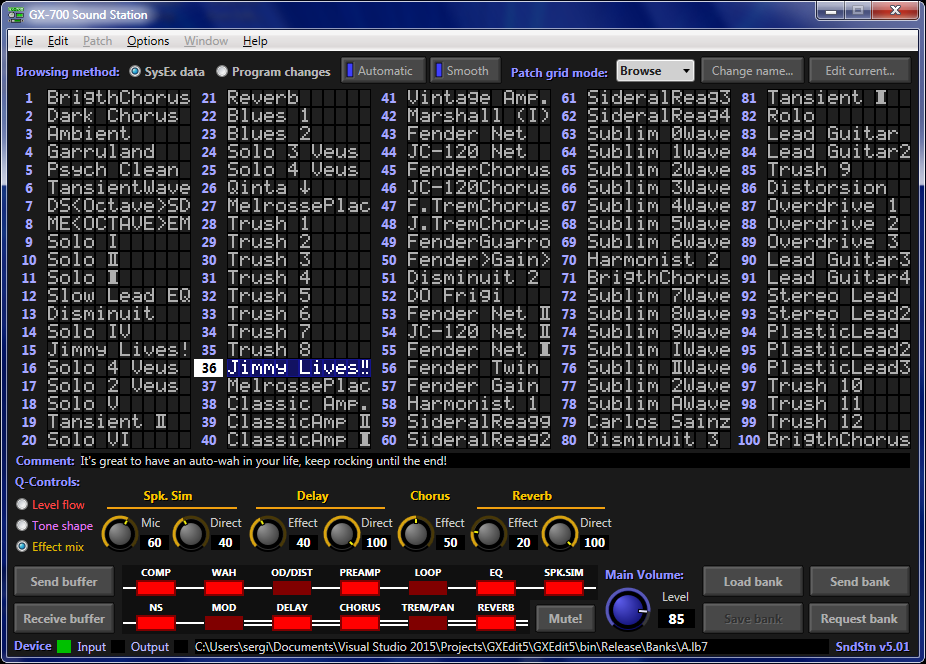
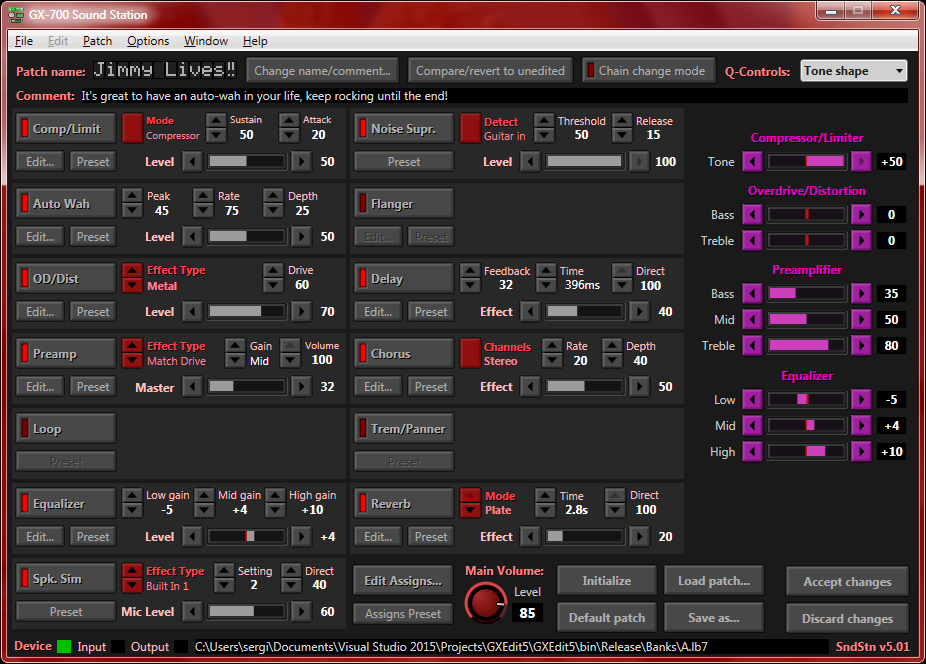
2 screenshots of the application's main window can be seen below:
(click on the images to enlarge them)
This new version has significatively higher demands on the systems, current minimum requirements are:
- Intel Core CPU running at 2.4 GHz or AMD equivalent.
- Windows 7 or newer Operating System, either 32 bit or 64. (x86 and x64 both supported)
- DPI may still be an issue, 96 DPI (100% interface scalling) is expected.
- Microsoft .NET Framework version 4.6.1, you need it installed for the application to run. You can download this element from here, remember to install it.
- The interface is bigger than in previous versions, 1024x768 resolution or higher is a must.
- A minimum of 128 MegaBytes of free RAM available, please note that the technology this version is based on consumes more resources.
The features have been improved respect the older versions, these include:
- Full native GX-700 charset support, the name you see in the software appears always like it does on the GX-700 screen. The software now also allows you to use the "Special" characters present on the GX-700 font in your patches.
- Bigger interface, no more limiting the main window to 640x480 width and height, heritage of the 90's interface design from the old versions.
- New "Quick-Controls" feature allowing shaping the tone, volume, and effect mix. Controllable from the main window at any time, both in bank-view and edit-view.
- Improved workflow of controls. Although the main layout is based on the old interface there are lot of new ways to interact with it now.
- The internal MIDI engine has been completely rewritten, it has a more "professional" error reporting system now, among other things. For example, the software now detects bad incoming checksums and checks for consistency and malformed data too.
- Visual Schemes are back, more powerful and customizable than ever. Pick your colors.
Please test extensively and make sure that the DEMO version runs without any problem before making any donation. If it doesn't work for you, the FULL version won't either. As there will be no refunds, sorry.
To gain access to the full version you should donate $46 to MIDIoz Software by clicking on the following PayPal button. After the donation, you must send an E-Mail here stating your email address and the PayPal transaction ID of the donation. This step is very important, so make sure you take note of your donation's PayPal transaction ID... (you might need to disable your browser ad-blocker add-on for the PayPal button to work properly, this site is clean and safe, don't worry)
Please allow 2 business days to get a reply with your download page and links for the non-demo version. You'll receive them by E-Mail. If you're in trouble with your download page or links, don't hesitate to send me a message.
Perform the following steps, they are the installation instructions:
- Download and install the .NET Framework 4.6.1 if you haven't already.
- Download the ZIP file from the link below this page if you agree to the disclaimer text.
- Due to Windows security measures on downloaded files, you should "Unblock" the ZIP file before opening it or extraction, this can be done by right-clicking on the ZIP file you've downloaded, selecting "Properties" and performing "Unblock" on the "General" tab.
- Extract its contents to any folder you may choose on your system. For example "C:\Program Files\GXEdit5" or another location.
- Create a shortcut to the application executable "GXEdit5.exe" on your desktop or wherever you want to launch the program from.
- Double-click on the shortcut. If you didn't perform step 3, a warning usually will appear for you to realize you're going to execute a file downloaded from the web and not unblocked. You can safely ignore those warnings. Also if you didn't unblock the ZIP file before extraction you should repeat the same process for the help file, called "GXEdit5.chm", which won't display the content if not unblocked.
- From there you can just click on the menu command "Help -> This doesn't work!" and continue being guided to configure the software.
 Note: If you have any problems don't contact by E-Mail at first, it's preferable that you post your issue in the "Technical Support" section of the official Sound Station forums. Also keep in mind that if the current version is in BETA stage, that means it may have incomplete or incorrect behaviours. Please report any error or bug in the forums, providing as much detail as you can.
By downloading any file from this site you agree to this disclaimer: (the use of this software means the acceptance of the following terms)
This software and all accompanying files are provided "as is" without any warranty, express or implied. This includes, but is not limited to implied warranties of merchantability or fitness for a particular purposse. In no event shall Sergio Fumaña Grünwaldt or MIDIoz Software be liable for any damages whatsoever arising out of the use or inability of this product.
 IMPORTANT: Although great care has been taken to make the file formats to be backward-compatible, preset files and Visual Schemes are not cross-compatible in 5.x respect the older 4.x versions. It's safe to copy banks and patches from the 4.x versions to the new version folders though, they use the same format for those kind of files.
Current version is 5.02 Beta7 (released on 12/01/2020)
Proceed to download the ZIP! - [Changelog]
Hits since 26/06/2013
© Copyright 1998-2020 MIDIoz Software, developed by Sergio Fumaña Grünwaldt